Monet Launcher - Android TV
- 4.6
- Rating
- 50.00K
- Installs
- Free
- Price

 Analysis by App-foxy
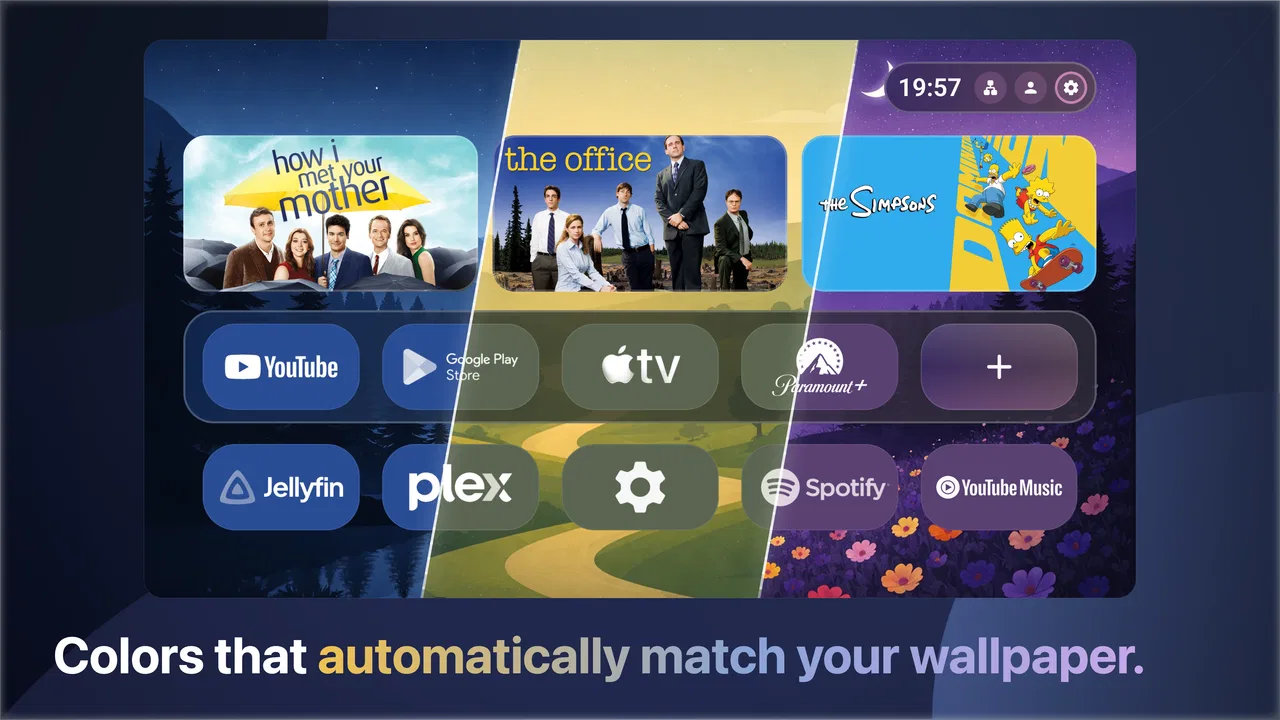
I spent time with Monet Launcher as a way to make an Android TV home screen feel more personal and less like a fixed wall of recommendations. Its main idea is straightforward: bring Material You styling, changing colors, weather-themed live wallpapers, and widgets into the launcher experience. That combination makes it more interesting than a basic app grid, especially if you care about how your television looks when you are not actively watching something.
What I like most is that the app treats the TV interface as part of the room rather than merely a menu. The visual design can respond to the overall color direction, while the wallpaper and widget elements add information without requiring me to open another app. It is still a launcher, so it has to remain practical, but the focus on atmosphere gives it a distinct personality in the Android TV personalization category.
How Monet Launcher changes the Android TV home screen
The app comes from Klevico and is available as a free Android TV personalization app. It is aimed at people using a compatible device running Android 8.0 or later, and its age rating is Everyone. The current release is version 1.0.76, which is useful context for anyone checking compatibility before changing the main interface of a television or streaming box.
You May Also Like

 Blood Strike: 2.5 Anniversary
Blood Strike’s Loadouts Turn Every Drop Into a Tactical Gamble
A close look at Blood Strike’s custom loadouts: how fast access to signature weapons reshapes its battle royale rhythm, rewards preparation, and narrows the gap between fights.

 Pandora - Music & Podcasts
Pandora’s Music Is Easy to Start, but Harder to Recover
Pandora’s strength is its low-effort path from a seed to a station. Its weak spot is how much confidence it asks you to place in connection, setup, and quiet recovery.

 8 Ball Pool
8 Ball Pool Is Built on Rivalries, Rematches, and Routine
A close look at the rivalries, rematches, shared routines, and unanswered safety questions that turn a quick pool match into a persistent mobile community.

 Samsung Music
Samsung Music’s Quiet Strength Is Playing What You Already Own
Its reach comes less from spectacle than from dependable access to a personal library. That simplicity is both the app’s strongest retention engine and its ceiling.

 AccuWeather: Weather Radar
AccuWeather Review: A Quick, Clear Forecast for Everyday Decisions
For everyday plans, the best forecast is the one you can understand quickly. AccuWeather makes rain timing, radar, and local conditions easy to act on, with a few trade-offs.

 Hill Climb Racing
Why Hill Climb Racing Still Turns Crashes Into One More Run
A tiny car, a bumpy hill and one more upgrade: Hill Climb Racing keeps resurfacing because its simple chaos makes every near-miss feel personal.
More From Our News Desk



In everyday use, the launcher sits between two familiar approaches. The first is the default Android TV home screen, which is usually designed around installed services, content rows, and recommendations. The second is a minimal launcher that removes almost everything except shortcuts. Monet Launcher takes a middle path: it keeps the home screen visually expressive while adding widgets and live wallpaper elements that can make the display feel more alive.
The Material You influence is particularly noticeable in the way the interface is presented. Rather than relying on a completely unrelated visual style, it aims for a more unified appearance. That matters if your other Android devices already use a modern, color-aware design language. The result is not simply a wallpaper replacement; the launcher is trying to make the background, interface colors, and useful information feel like parts of the same screen.
The weather live wallpaper is the feature that most clearly separates it from a plain launcher. A static image can look attractive for a few days and then become invisible through familiarity. A weather-focused background has a practical reason to change, so the screen can feel different without asking me to manually select new artwork. This is a good fit for a television in a living room, where the home screen may remain visible while I decide what to watch or when the TV is being used as background display.
What the free version means in practical terms
There is an important distinction between being free to install and having no paid elements at all. Monet Launcher can be obtained without an upfront purchase, while in-app purchases are listed at $4.99 per item. I would therefore approach it as a free starting point: you can judge the launcher itself before deciding whether any optional paid item is worthwhile.
That pricing structure makes the app easier to test than a launcher that asks for payment before I can understand its layout. It also means the value question depends on how much I care about the visual layer. If I only want faster access to streaming apps, a free default launcher may already do enough. If I want a more carefully styled home screen and expect to keep it for a long time, an optional purchase can make more sense, provided the particular item offers something I will actually use.
I would not treat the listed purchase price as a reason to install the app on its own. The useful part of the decision is whether the free experience already improves the television enough for my routine. A launcher is something I see repeatedly, so small interface frustrations can become more annoying than they first appear. Testing the free access first is the sensible route, especially on a device shared by several people.
Where the design delivers real value
The strongest value is visual consistency. Many Android TV interfaces feel assembled from separate parts: a background, rows of content, system shortcuts, and widgets that do not always look related. Monet Launcher is more appealing when I want those elements to form one scene. Material You styling gives the interface a recognizable direction, while the weather wallpaper helps prevent the home screen from feeling frozen.
The widgets also have a useful role beyond decoration. A television is not the first device I would choose for detailed information, but a glanceable display can still be helpful. For example, when I turn on the TV in the morning, a weather element on the home screen can help me decide whether to open a news app, plan a walk, or simply leave the house with a jacket. The benefit is not deep information; it is reducing one small interruption in an ordinary routine.
Another good use case is a secondary Android TV device in a bedroom, kitchen, or guest area. On a main television, I may spend most of my time inside streaming apps, so the launcher only appears briefly. On a less frequently used screen, the home interface can remain visible for longer, and the live wallpaper and widgets have more opportunity to justify their presence. In that setting, the app feels less like a cosmetic replacement and more like a small ambient display.
It can also suit someone who dislikes recommendation-heavy home screens. Monet Launcher does not need to compete with every content row to be useful. Its appeal is the sense that I am opening a personal dashboard rather than entering a storefront. That difference is subtle, but it can make the television feel calmer for viewers who prefer choosing an app directly instead of scrolling through promoted content.
Small workflow changes that make a difference
One practical approach is to treat the home screen as a launch point for habits rather than trying to show everything at once. I would keep the most frequently used shortcuts easy to reach, use the weather element for quick context, and avoid filling the screen with information that I will never read from the sofa. A television interface has more space than a phone, but that does not mean every available area needs a widget.
A second useful habit is to judge the launcher from the viewing distance that matters. An element that looks elegant close up may be too subtle across the room, while an overly busy wallpaper can compete with the app shortcuts. I would spend a few minutes checking the screen from the usual seat, not just while standing directly in front of the TV. This is especially important with live wallpapers, because motion and changing visual conditions can feel different during a normal evening than during setup.
For a shared television, I would also keep the layout understandable to someone who did not install it. Personalization is valuable only if the rest of the household can still find the streaming apps and settings they need. A highly individual arrangement may look better to one person but create friction for everyone else. The best setup is likely a restrained one: enough color and weather information to give the screen character, but not so much customization that basic navigation becomes a puzzle.
A third insight is to use the launcher as a transition screen. If I turn on the TV while deciding whether to watch something, the weather wallpaper and widgets can provide a moment of useful context without forcing me into a particular service. That is different from a content-first launcher, where the first screen may immediately push shows, films, or recommendations. People who want a neutral pause before choosing may appreciate this calmer workflow.
Tradeoffs compared with standard and minimal launchers
The default Android TV launcher remains the safer choice for people who want the platform’s familiar organization and do not care much about visual customization. It is usually easier for a household to understand because it matches what many users already expect. Choosing Monet Launcher means accepting a different home-screen philosophy: the interface is more personal and atmospheric, but it may require a little adjustment before it feels natural.
A minimal launcher can be better for a different kind of user. If the goal is the shortest possible path from power-on to one or two apps, a stripped-down design may be more efficient. Monet Launcher’s live wallpaper, color treatment, and widgets are valuable only if I want the home screen to communicate something or look distinctive. For someone who sees the launcher for only a second before opening an app, those features may not justify changing the default experience.
The weather focus is also a tradeoff rather than an automatic advantage. It gives the background a reason to change, but anyone who prefers a completely stable visual environment may find dynamic presentation distracting. Likewise, viewers who want a cinematic or personal-photo background may prefer a launcher built around static artwork. Monet Launcher makes more sense when weather and Material You styling are part of the desired look, not merely features I tolerate because they are available.
There is a practical consideration with any replacement launcher: it becomes part of the basic navigation layer. If something feels slower, less familiar, or awkward with a particular remote, that inconvenience can affect every session. I would test directional navigation, app selection, returning to the home screen, and switching between users or services before committing to it as the permanent interface. The app may be attractive, but attractiveness should not outweigh the basic comfort of using a remote from across the room.
The paid-item model adds another decision point. A $4.99 purchase is not automatically expensive, but its value is personal because the app’s main benefit is presentation. I would pay only for an item that improves the way I actually use the TV, not simply because it unlocks a more elaborate appearance. Someone who changes wallpapers often may see more value than someone who sets up the screen once and rarely looks at it.
Who is likely to get the most from it
I think Monet Launcher is best suited to Android TV owners who see personalization as part of the device experience. It is especially appealing if the default home screen feels cluttered, overly content-driven, or visually disconnected from the rest of the room. The combination of dynamic color, weather live wallpapers, and widgets gives those users a clear reason to try it rather than installing another generic shortcut grid.
It is also a good candidate for people who use a television as an ambient screen. A display in a kitchen, office, or bedroom can benefit from a home screen that offers a quick glance at weather while still leading to entertainment apps. The app is less compelling for someone who powers on the television only to launch one service and immediately starts watching.
Families should consider the learning curve before switching. If everyone is comfortable with a little change, the more personal layout can make the TV feel nicer. If the device is used by guests, older relatives, or children who rely on the standard arrangement, keeping the interface simple may be more important than gaining a more attractive background.
The app is also a reasonable experiment for anyone who wants to personalize Android TV without buying a new device. Since it is free to start, I can evaluate the visual style and daily workflow first. That lowers the risk of discovering that a launcher replacement is not worth the adjustment. The purchase option matters later, after I know whether the free experience has become part of my routine.
What to check before making it permanent
Before settling on Monet Launcher, I would check whether the target television or streaming box runs Android 8.0 or later, then spend a normal evening using it rather than judging it only during setup. Open the apps used most often, return home several times, and let the screen sit idle. This reveals whether the visual changes remain pleasant when they are no longer new.
I would also decide whether the weather element is genuinely useful in the room where the TV is installed. In a living room near a window, a quick weather glance can be convenient. In a dark home-theater setup, a changing background may be less desirable. The right choice depends on whether the launcher is functioning as a dashboard, a decorative screen, or simply a shortcut menu.
Another question is whether the people sharing the TV value consistency more than customization. If the answer is consistency, the standard launcher may remain the better option. If the answer is atmosphere and a less commercial-looking starting point, Monet Launcher has a clearer advantage. This is not a universal upgrade; it is a choice about what the home screen should do.
My verdict on the free-to-paid value
Monet Launcher is worth trying when the Android TV home screen feels too ordinary and I want a more coordinated visual experience. Its appeal comes from the combination of Material You-inspired color, weather live wallpapers, and widgets, rather than from one isolated feature. That makes it more distinctive than a basic launcher, while still keeping the purpose familiar: helping me reach the apps I use.
I would recommend starting with the free access and using it in a real household routine. If the home screen becomes more pleasant and the widget information earns its space, the optional $4.99-per-item purchases can be considered as paid personalization rather than a required entry fee. If I barely notice the launcher after opening the first app, spending more would not add much value.
With an average rating of 4.6 from around 1.8 thousand ratings and over 50 thousand installs, it has already attracted a meaningful group of Android TV users. Those figures do not replace personal testing, but they suggest the concept is connecting with people who want a more expressive television interface. Klevico has kept the idea focused, which helps the app stand out without pretending to replace the entire Android TV ecosystem.
My final view is positive but selective. I would choose Monet Launcher for a television that remains visible, for a room where weather information is useful, or for anyone tired of a recommendation-first home screen. I would skip it if maximum simplicity, familiar navigation, or a completely static display matters more than appearance. The best reason to install it is not that it changes the wallpaper; it is that it changes what the TV feels like between viewing sessions.
FAQs for Monet Launcher - Android TV
01What is Monet Launcher - Android TV, and what does it do?
Monet Launcher - Android TV is an alternative home-screen launcher designed for Android TV devices and compatible TV boxes. It replaces the standard interface with a more personalized layout for accessing installed apps, settings, and content. Its main appeal is giving users greater control over the appearance and organization of the TV home screen, although the exact experience may vary depending on the device, Android TV version, and manufacturer restrictions.
02Is Monet Launcher - Android TV compatible with every smart TV or TV box?
Compatibility is not guaranteed on every television or streaming device. Monet Launcher is intended primarily for Android TV and Google TV hardware, but some manufacturers limit the use of third-party launchers or prevent them from becoming the default home screen. Before downloading, check your device's Android version, available storage, and whether it allows alternative launchers. Compatibility can also differ between certified Android TV products and generic Android-based TV boxes.
03Can Monet Launcher be set as the default launcher on Android TV?
On supported devices, Monet Launcher may be selected as the default home application, allowing it to appear whenever you press the Home button. However, Android TV manufacturers and system updates can restrict this option, and some devices may continue opening the original launcher. If the default setting is unavailable, you may still be able to open Monet Launcher manually, but the experience will be less seamless than using it as the permanent home interface.
04Does Monet Launcher - Android TV affect performance or use many resources?
A launcher runs continuously as part of the TV's home-screen experience, so its performance depends on the device's processor, memory, Android version, and number of installed applications. On newer Android TV hardware, navigation should generally feel comfortable, while older or low-cost boxes may show slower transitions or occasional delays. If your device has limited storage or RAM, monitor performance after installation and remove the launcher if it causes instability.
05Is Monet Launcher - Android TV safe to download and use?
As with any third-party launcher, users should download Monet Launcher from a trustworthy source and review the permissions requested during installation. A launcher may need access related to displaying apps or becoming the home application, but unnecessary permissions should be treated cautiously. Keep Android TV updated, avoid modified APK files from unknown websites, and read recent user feedback. Also remember that changing the launcher can affect navigation, shortcuts, and access to manufacturer-specific features.
Pros
- Clean
- TV-friendly interface with large icons and easy navigation.
- Helps organize installed apps into a more focused Android TV home screen.
- Lightweight design can feel faster than feature-heavy launchers.
- Useful for users who want a simpler alternative to stock Android TV.
- Works well with remote controls and standard TV navigation buttons.
Cons
- Customization options may be limited compared with advanced launchers.
- Some Android TV devices may restrict default launcher replacement.
- Ads or promotional elements may appear depending on the version.
- Compatibility and layout behavior can vary across TV brands and models.
- May require extra setup to restore the original launcher if preferred.

Monet Launcher - Android TV
Gallery